The ‘Source Stack’ Audit: Mapping Every Tool, Doc, and Channel Your AI Blog Should Be Mining for Topics


If you’ve ever sat down to plan content and thought, “We’ve already written everything worth saying,” this post is for you.
Most teams don’t have a topic problem. They have a source problem.
Your business is already generating a constant stream of raw material:
- Sales calls and demos
- Support tickets and live chat
- Internal playbooks and training docs
- Product analytics and roadmap notes
- Partner enablement decks and webinars
But without a clear system, all of that lives in silos—while your blog calendar depends on sporadic brainstorms and keyword lists.
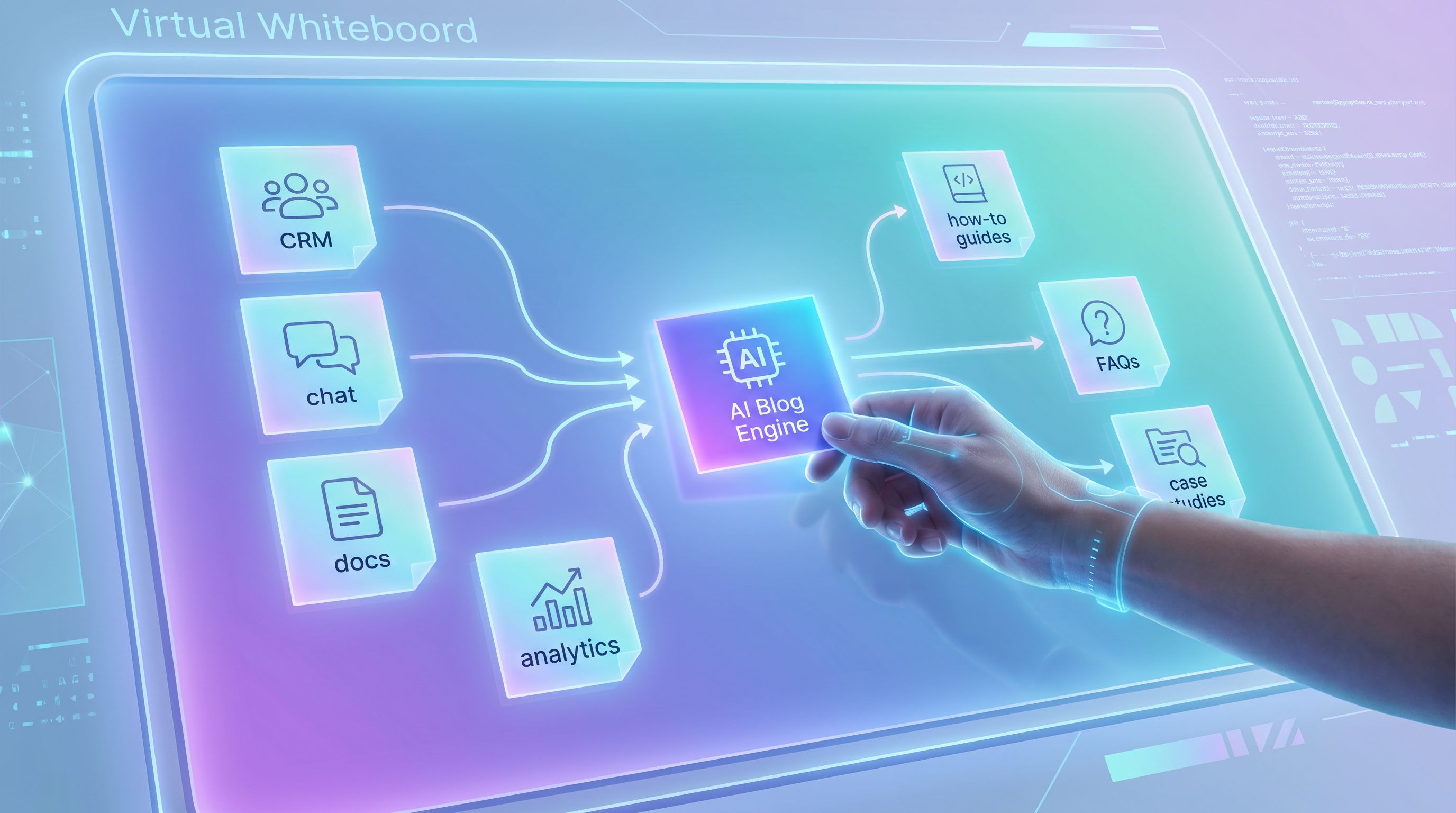
A “Source Stack” audit fixes that. Instead of asking, “What should we write next?” you ask, “What sources should our AI be mining every week?” Then you design your AI blogging engine—whether that’s a stack of tools or a platform like Blogg—around those sources.
This post walks through how to:
- Map your full source stack across tools, docs, and channels
- Decide which sources are worth mining (and which to ignore)
- Turn messy, unstructured inputs into AI-ready prompts
- Plug everything into an always-on blog engine so ideas never run dry
Why Your Source Stack Matters More Than Your Next Topic Idea
Most content strategies start at the post level:
"We need three posts on onboarding, two case studies, and something about our new feature."
That works—until it doesn’t.
As you scale, you need a system that:
- Continuously surfaces new topics from real customer behavior, not just keyword tools
- Keeps content aligned with product reality (what you actually ship and support)
- Reflects the whole customer journey, not just top-of-funnel traffic plays
Your source stack is that system’s foundation.
When you get it right:
- Your AI blog never runs out of relevant ideas
- Posts naturally align with sales, support, and product priorities
- You capture insights from offline and private channels that competitors never see
If you’ve read about the “promptless blog” approach, this is the prerequisite: knowing what your AI should be allowed to mine.
Step 1: Inventory Your Source Stack Across the Whole Business
Start by mapping where knowledge actually lives in your company. Not where you wish it lived.
Break it into three layers:
- Customer-facing tools (where questions and objections show up)
- Internal knowledge and process docs (how you actually operate)
- Product and revenue systems (what people use and what drives deals)
1) Customer-Facing Tools
Look for any channel where customers or prospects:
- Ask questions
- Share objections
- Describe their goals or constraints
Common sources:
- Support & success: Zendesk, Intercom, Help Scout, Front
- Sales & CS calls: Gong, Chorus, Zoom recordings
- Live chat & chatbots: site widgets, in-app chat
- Community & social: Slack communities, LinkedIn DMs, user forums
Every one of these is a stream of search queries in disguise.
If your business is heavy on phone calls, walk-ins, or paper forms, pair this with the playbook from AI Blogging for Offline-Heavy Businesses to capture those “invisible” conversations too.
2) Internal Knowledge & Process Docs
Next, list out where your internal expertise lives:
- Notion or Confluence spaces
- Google Drive folders (playbooks, decks, PDFs)
- Onboarding and training docs
- Implementation guides and solution design docs
- Strategy memos and AMAs
These are perfect inputs for posts that:
- Explain your methodology
- Share implementation best practices
- Turn “tribal knowledge” into searchable authority content
If you’re already turning playbooks into public resources, this dovetails with the workflows in From Playbook PDFs to ‘Problem Hub’ Posts.
3) Product & Revenue Systems
Finally, look at the systems that track what people actually do with you:
- Product analytics (Mixpanel, Amplitude, PostHog)
- CRM and pipeline (HubSpot, Salesforce, Pipedrive)
- Billing and usage (Stripe, Chargebee, in-house billing)
- Roadmap tools (Linear, Jira, Productboard)
These sources answer questions like:
- Which features get used together?
- Where do users typically stall in onboarding?
- Which segments have the highest LTV—and what do they care about?
- What upcoming releases will change our story this quarter?
Those insights become:
- Use-case posts
- Advanced how-tos
- “What good looks like” benchmark content
- Release-driven content series
If you’re in PLG, combine this with the ideas in AI Blogging for PLG SaaS to turn usage data into an editorial roadmap.

Step 2: Score Each Source on Signal, Access, and Effort
Once you’ve listed your sources, you need to prioritize. Not every tool deserves a place in your AI blog engine.
Use a simple 1–5 score for each of these dimensions:
- Signal quality – How close is this source to real customer problems?
- Access & structure – How easy is it to pull data in a usable format?
- Effort vs. payoff – How much setup does it require vs. likely content yield?
1) Signal Quality
High-signal sources:
- Support tickets about recurring problems
- Sales call snippets where objections surface
- Implementation notes documenting tricky edge cases
- Product usage patterns that correlate with retention
Lower-signal sources:
- Generic social comments
- Vanity survey responses with little depth
- Internal brainstorm docs that never got tested with customers
Ask:
- Does this source reflect real stakes (time, money, risk) for our buyers?
- Are the questions specific and repeated, or vague and one-off?
2) Access & Structure
You want sources that are either:
- Already structured (fields, tags, categories), or
- Easy for AI to structure (transcripts, text logs)
Examples:
- Easy: Chat logs, call transcripts, text-based support tickets
- Medium: PDFs, slide decks, long-form docs
- Hard: Scanned paper forms, handwritten notes, ad-hoc whiteboard photos
A platform like Blogg can handle a mix of these, but you’ll still get better results if you start with sources where text extraction is straightforward.
3) Effort vs. Payoff
Some sources require integrations, permissions, or heavy cleanup. Others are ready to go.
Ask:
- If we wired this into our AI engine, how many distinct topics per month could we get?
- Will this source stay fresh, or does it need constant manual updating?
Then, for each source, assign a quick label:
- Core – High signal, easy access, strong payoff
- Secondary – Medium signal or effort, still valuable
- Archive – Low signal or high effort; use for occasional deep dives
Your goal: identify 3–5 Core Sources that will power most of your AI blogging.
Step 3: Define What Each Source Is “Allowed” to Feed
Not every source should generate every type of post. Guardrails matter—especially once AI is in the loop.
For each Core Source, define:
- Primary content types it should generate
- Topics or angles it should avoid
- Metadata AI should always capture
Example: Support Tickets
- Use for:
- “How to fix…” troubleshooting guides
- “What to do if…” workflow posts
- Preemptive education to reduce ticket volume (see The Silent Funnel Fix)
- Avoid for:
- Pricing promises
- Strategic positioning
- Competitive claims
- Metadata to capture:
- Product area
- Plan type
- Severity/impact
- First-time vs. repeat issue
Example: Sales Call Transcripts
- Use for:
- Objection handling posts
- “Is this right for us if…?” qualification content
- Industry-specific use-case stories
- Avoid for:
- Naming specific prospects or deals
- Revealing custom pricing or terms
- Metadata to capture:
- Segment (SMB, mid-market, enterprise)
- Industry
- Stage in funnel
Example: Product Analytics
- Use for:
- Best-practice guides (“Teams that do X see Y outcome”)
- Feature pairing posts (“If you use A, you should also use B for Z result”)
- Milestone content (“What to set up in your first 7 days”)
- Avoid for:
- Individual customer stories without consent
- Anything that could expose sensitive data
- Metadata to capture:
- Feature set
- Milestone achieved
- Time-to-value
Document these rules once, then bake them into your AI prompts or configuration. With Blogg, this can live alongside your brand voice and positioning as part of a reusable prompt library.
Step 4: Turn Messy Inputs into AI-Ready Structures
Once you know what you’re pulling from, you need a way to normalize those inputs so AI can reliably turn them into posts.
Think in terms of schemas, not tools.
For each source, define a simple schema like:
- Question/Problem – What did the customer ask or struggle with?
- Context – Who are they (segment, plan, use case)?
- Outcome – What resolution or result did they get?
- Supporting assets – Screenshots, docs, feature pages
Then, use AI to transform raw material into that schema.
Example: From Call Transcript to Structured Input
- Export or integrate your call recording tool.
- Run a prompt like:
“From this transcript, extract:
- The 3–5 most important questions the prospect asked
- Their role, company size, and industry
- The main objections they raised
- The final outcome of the call Return as JSON.”
- Store those outputs in a simple table or database your AI blog engine can read.
Now, instead of prompting off a 60-minute transcript, you’re prompting off a clean, structured summary.
This is the same principle behind the “Zero-Draft” workflow: treat messy material as raw ore, and let AI do the first pass of refinement.
Example: From Support Tickets to FAQ Clusters
- Pull last 90 days of tickets tagged with a specific product area.
- Use AI to:
- Group similar questions
- Label each cluster with a canonical question
- Identify which clusters show up most often
- For each cluster, define:
- One “pillar” post (deep guide)
- 3–5 supporting posts (variations by segment, integration, or scenario)
Feed that map into Blogg or your AI tool of choice, and you’ve got a ready-made content cluster.
Step 5: Wire Your Sources into a Repeatable AI Blog Engine
Now it’s time to move from one-off projects to an ongoing system.
You want a simple loop:
- Ingest – Pull new data from your Core Sources on a schedule
- Select – Choose the most valuable topics for the next publishing window
- Draft – Let AI create outlines and posts based on your schemas and guardrails
- Review & refine – Human review for accuracy, nuance, and strategy
- Publish & measure – Ship posts, track performance, feed insights back into the system
1) Ingest on a Cadence
Set up recurring pulls like:
- Weekly: New support tickets in key categories
- Weekly: New sales calls from late-stage opportunities
- Monthly: Product usage snapshots and milestone data
- Quarterly: Roadmap updates and strategic memos
If you’re using Blogg, this can look like connecting key tools once, then letting the platform continuously mine them for new topics.
2) Select with Simple Rules
Don’t let topic selection become another bottleneck.
Define a few prioritization rules:
- Impact – Does this topic:
- Reduce friction (fewer tickets, smoother onboarding)?
- Support revenue (better qualification, objection handling)?
- Search potential – Is there clear search demand or a cluster we’re building?
- Coverage gap – Do we already have content on this, or is it net-new?
Use AI to score and shortlist topics each week, then have a human make the final call.
3) Draft with Reusable Prompt Patterns
Instead of inventing prompts from scratch, create templates tied to your schemas. For example:
-
“Question-First Explainer”
- Input: Customer question + context + outcome
- Output: SEO post that answers the question, shows examples, and links to product features
-
“Implementation Playbook”
- Input: Internal doc + 2–3 real-world scenarios
- Output: Step-by-step guide with screenshots and pitfalls
-
“Objection Handling Post”
- Input: Objection + 3–5 call snippets where it came up
- Output: Post that acknowledges the concern, reframes it, and shows proof
Patterns like these are perfect candidates for automation inside Blogg, where you can standardize structure, tone, and SEO elements.
4) Publish with Built-In Maintenance
Your source stack shouldn’t just power net-new posts. It should also tell you what to update.
For example:
- A spike in tickets about a feature you’ve already written about? Time for an update.
- A new release that changes onboarding steps? Trigger an Evergreen Refresh.
Pair your Source Stack audit with the process in The ‘Evergreen Refresh’ Loop so your AI isn’t just adding content—it’s maintaining it.
Step 6: Make Ownership and Guardrails Explicit
A Source Stack audit isn’t just a spreadsheet exercise. It’s an organizational agreement.
Clarify:
- Who owns each source (support, sales, product, marketing)
- What access AI tools have, and where humans must stay in the loop
- What’s off-limits for public content (confidential data, roadmap secrets, sensitive use cases)
A few practical moves:
- Create a short “AI Content Guardrails” doc that covers:
- Red lines (what AI content must never say or claim)
- Review rules (which posts require legal or security review)
- Data handling standards (what can and can’t leave core systems)
- Set up source-specific reviewers:
- Support lead reviews troubleshooting content
- Product marketing reviews feature and roadmap content
- Sales leadership reviews pricing/positioning content
If multiple teams are touching your AI blog engine, you’ll want the kind of simple rules outlined in From Editorial Chaos to ‘AI Guardrails’ to keep everything coherent.
Putting It All Together: A Simple Starter Blueprint
If you want a concrete starting point, here’s a minimal viable Source Stack you can set up in a month:
-
Choose 3 Core Sources
- Support tickets for your top 3 product areas
- Sales calls from opportunities over a certain deal size
- Product analytics on onboarding milestones
-
Define Schemas & Prompts
- Support → FAQ clusters → “Question-First Explainer” posts
- Sales calls → Objection summaries → “Objection Handling” posts
- Product analytics → Milestone patterns → “Success Playbook” posts
-
Wire into Blogg (or your AI engine)
- Connect tools or upload exports on a schedule
- Configure guardrails and post templates
-
Run a 90-Day Experiment
- Commit to 1–3 posts per week sourced only from your Core Sources
- Track:
- Ticket deflection for covered topics
- Sales cycle time and win rates for covered objections
- Activation and retention for covered milestones
-
Review and Expand
- After 90 days, promote 1–2 Secondary Sources into your Core Stack
- Prune any sources that produce noise but little impact
You’ll end up with a blog that feels less like a random content feed and more like an always-on reflection of what your customers actually need from you.
Summary
A Source Stack audit shifts your AI blogging strategy from “What should we write?” to “What should we listen to?”
By:
- Mapping every tool, doc, and channel where insight lives
- Scoring sources for signal, access, and payoff
- Defining clear guardrails and schemas for each
- Wiring them into a repeatable AI blog engine
…you create a system where your blog naturally stays aligned with:
- Real customer questions and objections
- Actual product usage and outcomes
- The priorities of sales, support, and product teams
Instead of scrambling for topics, you’ll be choosing from a backlog of high-intent, high-impact ideas that your own business generates every day.
Your Next Step
Don’t try to boil the ocean.
- List your sources. Take 20 minutes and write down every place your company stores customer questions, internal know-how, and product data.
- Pick three. Choose the 3 highest-signal, easiest-to-access sources. Label them as your initial Core Stack.
- Run a 90-day test. Use those sources—and only those—to power your AI blog. Whether you wire them into Blogg or another system, commit to publishing from your stack, not from scratch.
If you want an engine that’s built for this style of publishing—from source mapping to drafting to scheduling—explore how Blogg can sit on top of your stack and keep your blog active while you stay focused on running the business.