‘Ops-Driven’ Blogging: Turning RevOps, CS, and Support Insights into a Unified AI Content Engine


Most blogs are still built around marketing’s ideas.
But your sharpest insights about what actually wins, expands, and saves revenue rarely live in marketing.
They live in:
- RevOps dashboards showing where pipeline stalls and which segments convert
- Customer Success playbooks spelling out what healthy adoption really looks like
- Support queues full of the questions, frustrations, and edge cases your buyers care about most
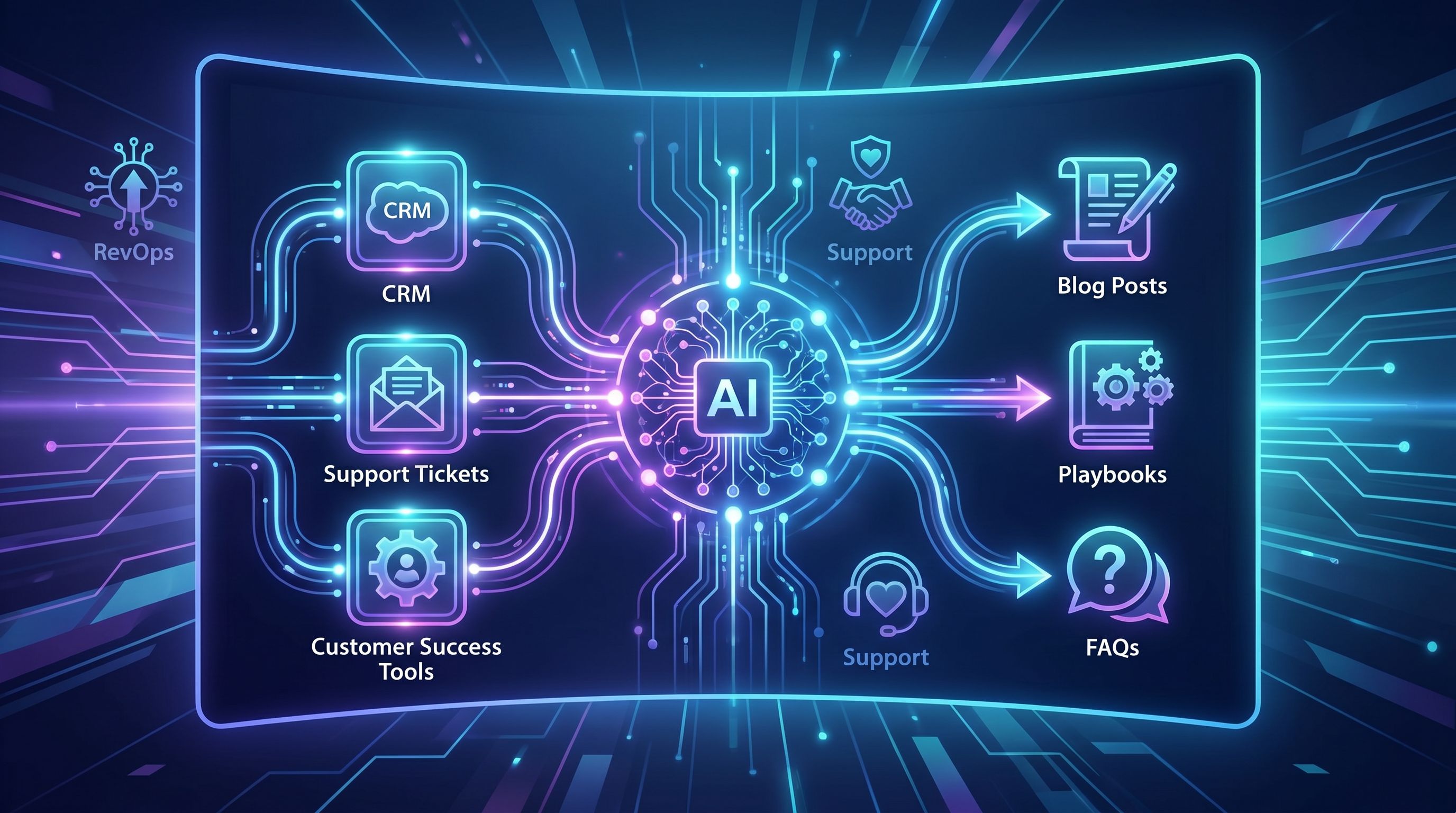
An ops‑driven blog flips the usual model. Instead of guessing at topics from keyword tools alone, you wire your content engine directly into RevOps, CS, and Support. Then you use AI to turn that stream of signals into a steady flow of search‑ready posts, playbooks, and FAQs.
That’s how your blog stops being “marketing’s side project” and becomes a unified revenue asset.
Why this matters for revenue, not just rankings
RevOps exists to unify sales, marketing, and CS around one operating model, one view of the customer, and one source of truth. Done well, that alignment correlates with stronger growth and more predictable pipeline because everyone is working from the same data and definitions.
Your blog should follow the same pattern.
When content is driven by RevOps, CS, and Support:
- Topics map to real revenue friction. You’re writing about stalled stages, churn triggers, and expansion patterns—not just broad “thought leadership.”
- Posts match the language of your buyers. Call notes, QBR decks, and tickets capture how customers actually describe their problems. That’s gold for SEO and conversion.
- Content closes the loop on insights. Instead of insights living and dying in dashboards or internal docs, they become public assets that attract, educate, and qualify future customers.
- You get compounding leverage. A single AI‑generated post can support search, sales enablement, onboarding, and retention.
If you’ve already been thinking about turning internal docs into search assets, you’ll recognize the same pattern from posts like From SOPs to SEO: How to Turn Internal Process Docs into Blogg-Powered Traffic Magnets. Ops‑driven blogging is the same idea—just wired into the live signals coming from your revenue systems.
What “ops‑driven” looks like in practice
Let’s define it concretely.
An ops‑driven blog is one where:
- RevOps owns the insight pipeline. They identify the highest‑impact questions, patterns, and bottlenecks across CRM, product, billing, and support tools.
- CS and Support curate the voice of the customer. They surface real phrases, objections, and scenarios that content should mirror.
- AI handles the heavy lifting. A platform like Blogg transforms those inputs into SEO‑ready outlines, drafts, and publishing schedules.
- Marketing shapes narrative and distribution. They ensure posts are on‑brand, search‑optimized, and plugged into campaigns.
The result isn’t “more content.” It’s more relevant content, shipped consistently, with a clear line back to revenue.

Step 1: Build a shared signal map
Before you involve AI or change your tooling, you need to decide which signals actually deserve a seat at the content table.
Start with a simple map of where revenue‑critical insight lives today:
From RevOps
- Stages where deals most often stall
- Segments with unusually high or low win rates
- Patterns in deal size or sales cycle length
- Common fields in “closed lost” reasons
- Expansion triggers and leading indicators of churn
From Customer Success
- Onboarding steps where customers get stuck
- Features that correlate with long‑term retention
- Common “how do I…” questions in QBRs
- Stories from accounts that expanded vs. accounts that quietly shrank
If you’re already thinking about how onboarding content shortens time‑to‑value, you’ll find a lot of overlap with From Blogg Draft to Onboarding Guide: Reusing AI Posts to Shorten Time-to-Value for New Customers.
From Support
- High‑volume ticket categories and macros
- Bugs or edge cases that confuse users
- Pre‑churn signals like “how to cancel” or “export my data” queries (these also show up in search console)
- Integrations, workflows, or environments that cause the most friction
Make it usable:
Create a simple, shared doc or dashboard that answers:
- “What are our top 10 revenue friction points this quarter?”
- “What are the top 20 questions customers ask across sales, CS, and Support?”
- “Which segments or use cases are most strategic for us right now?”
This becomes the backlog for your AI content engine.
Step 2: Turn raw signals into structured content inputs
AI is powerful, but it’s only as good as the inputs you feed it.
Your goal is to convert messy operational data into structured prompts that a platform like Blogg can reliably turn into high‑quality posts.
Define a standard “content input card”
For each insight or pattern, capture:
- Source: RevOps / CS / Support (+ system: CRM, call transcripts, helpdesk, etc.)
- Signal: Short description of the pattern (e.g., “Mid‑market deals stall at security review”)
- Buyer context: Role, segment, industry, product plan
- Business impact: Pipeline blocked, churn risk, expansion opportunity, support cost
- Customer language: Real phrases pulled from notes, tickets, or transcripts
- SEO angle: Draft keyword theme or question (you can refine this later)
Example card:
Source: Support (Zendesk), CS (Gong transcripts)
Signal: High volume of tickets and call questions about “connecting CRM to billing system”
Buyer context: Ops leaders at 50–200 seat SaaS companies
Business impact: Slows onboarding, causes data mistrust, drives upgrade hesitation
Customer language: “Our numbers don’t match across systems,” “attribution is broken,” “we can’t trust the dashboard”
SEO angle: “how to sync salesforce with stripe for revenue reporting”
Feed this card into your AI workflow, and you’ll get posts that sound like your customers and target real problems.
If you’re already using the kind of “prompt systems” described in Prompt Playlists, Not Prompts: Building Reusable AI Sequences for Ideation, Drafting, and Optimization, this card is the raw material you’ll run through those playlists.
Step 3: Design your AI content engine around RevOps
Now you’re ready to build the actual engine: a repeatable workflow that takes those input cards and turns them into published posts.
Here’s a simple version you can run weekly or bi‑weekly.
1. Intake and prioritization
- RevOps, CS, and Support each nominate 3–5 new signals from the past week.
- In a 30‑minute async review (or quick meeting), score them on:
- Revenue impact (pipeline, churn, expansion)
- Strategic fit (ICP, current GTM focus)
- Content gap (do we already cover this?)
- Select 5–10 cards to send into the AI engine.
2. AI‑assisted ideation and clustering
Using Blogg or a similar platform, you can:
- Turn each input card into multiple post ideas, such as:
- A deep‑dive playbook
- A troubleshooting guide
- A comparison or teardown
- A “mistakes to avoid” list
- Cluster related ideas into mini‑series (e.g., “RevOps data trust,” “onboarding speed,” “integration reliability”).
This is where you start to see your blog shift from random posts to coherent content pillars that mirror your revenue motion.
3. Drafting and enrichment
For each selected topic, your AI workflow should:
- Pull in relevant customer language from transcripts or tickets (sanitized and anonymized).
- Incorporate RevOps metrics or benchmarks where available (conversion lifts, time‑to‑value, NRR impact).
- Propose SEO‑aware structure: H2s, FAQs, schema opportunities, internal links.
The human layer (usually marketing + one ops stakeholder) then:
- Validates accuracy and nuance
- Adds product‑specific examples or screenshots
- Tightens the narrative and ensures it aligns with your positioning
4. Publishing and routing
Once a post is approved, decide where else it should live beyond the blog:
- Sales enablement (linked from relevant sequences or battlecards)
- CS playbooks (used in onboarding, QBRs, or renewal decks)
- Support macros (linked in ticket replies instead of rewriting explanations)
You’re no longer creating content for the blog. You’re using the blog as the public surface area of a broader enablement system.
Step 4: Connect posts to the revenue journey
To keep this engine funded and credible, you need to show that ops‑driven posts do more than collect impressions.
Map each post to a specific part of the customer journey:
- Top of funnel: Posts that mirror early‑stage questions and problems (e.g., “How to design a RevOps‑friendly onboarding process”).
- Mid‑funnel: Deep dives that help buyers evaluate approaches, compare solutions, and build internal business cases.
- Bottom‑funnel / post‑sale: Implementation guides, troubleshooting posts, and expansion playbooks.
For each new post, answer:
- Which lifecycle stage is this for?
- Which team will use it most (Sales, CS, Support)?
- What metric should it influence? (e.g., demo‑to‑close rate, onboarding time, ticket deflection, expansion rate)
Then wire those answers into your tracking:
- Add UTM parameters and CRM fields that indicate “influenced by content X.”
- Tag posts in your knowledge base or enablement platform so CS and Support can report on usage.
- Include key posts in RevOps reporting so they show up alongside campaigns and plays.
Over time, you’ll see patterns like:
- Deals that viewed your “data trust” series close faster and churn less.
- Accounts that read onboarding posts submit fewer tickets and expand earlier.
Those are the kinds of insights you can then feed back into your content engine—and into broader GTM strategy.
Step 5: Use AI to keep the loop tight, not just to ship more
The biggest risk with AI is volume without learning.
An ops‑driven engine should get smarter every month. Here’s how to keep the loop tight:
Monitor performance by input source
Don’t just look at traffic or rankings in aggregate. Break performance down by signal source:
- Posts rooted in RevOps data (e.g., win/loss, stage analysis)
- Posts rooted in CS insights (e.g., adoption patterns, expansion stories)
- Posts rooted in Support data (e.g., high‑volume tickets, edge cases)
Look for:
- Which source tends to drive pipeline‑influenced sessions?
- Which source tends to drive product activation or feature usage?
- Which source tends to drive ticket deflection?
Use those patterns to adjust your intake and prioritization.
Continuously refresh and repurpose
Because your inputs are live operational data, your content should rarely be “one and done.”
Use AI to:
- Refresh posts when metrics or playbooks change (especially anything tied to pricing, packaging, or implementation).
- Spin out net‑new posts from high‑performing sections (e.g., turn a subsection into a standalone playbook).
- Turn blog content into checklists, templates, and internal SOPs—and vice versa.
If you’re sitting on a backlog of older posts that were written without this ops lens, you can retrofit them using the approach in From Blog Dust to Deal Flow: Using AI to Turn Stale Posts into Revenue-Focused Refreshes.
Guardrails for quality and trust
Finally, make sure your AI content engine has clear guardrails:
- Data sensitivity: Strip out PII, company names, and confidential details from tickets and transcripts before they become prompts.
- Source of truth: If your RevOps metric charter changes (definitions, segments, lifecycle stages), update your AI prompt templates so posts don’t contradict your dashboards.
- Human review: Require sign‑off from at least one ops stakeholder and one marketer for any post that cites metrics or process details.
This keeps your blog aligned with the same standards RevOps uses for reporting and decision‑making.
Putting it all together: a 30‑day rollout plan
If you want to pilot ops‑driven blogging without boiling the ocean, here’s a practical 30‑day plan.
Week 1 – Map and select signals
- Run a 60‑minute workshop with RevOps, CS, Support, and Marketing.
- Build your first signal map and agree on 10–15 priority insights.
- Turn those into content input cards.
Week 2 – Set up your AI workflows
- Configure Blogg (or your AI stack) with:
- Your brand voice and style guidelines
- Target personas and segments
- Example posts you consider “great”
- Create a prompt playlist that turns each card into:
- 3–5 post ideas
- A detailed outline
- A first draft
Week 3 – Draft, review, and publish
- Generate drafts for 5–7 posts.
- Have RevOps/CS/Support review for accuracy and nuance; marketing polishes for narrative and SEO.
- Publish at least 3 posts and route them to Sales, CS, and Support with clear usage suggestions.
Week 4 – Measure and iterate
- Track early signals: search impressions, engagement, internal usage (e.g., links dropped in tickets or QBR decks).
- Gather qualitative feedback from frontline teams: “Which posts are you actually using?”
- Refine your intake process and prompt templates based on what worked.
By the end of 30 days, you’ll have:
- A working ops‑driven content loop
- A small but meaningful library of posts tied to real revenue friction
- A clear sense of how AI can amplify—not replace—the judgment of your RevOps, CS, and Support teams
Summary
An ops‑driven blog treats RevOps, Customer Success, and Support as primary inputs, not afterthoughts.
You:
- Map the signals those teams see every day
- Turn them into structured content inputs
- Use AI (and platforms like Blogg) to transform them into search‑ready posts and enablement assets
- Connect each post to a specific stage of the revenue journey
- Continuously learn which signals produce the biggest impact
The payoff is a blog that doesn’t just attract anonymous visitors. It moves real accounts through your funnel, accelerates onboarding, and supports expansion and retention—all while making your RevOps, CS, and Support insights visible and reusable.
Your next step
If your blog is still driven mostly by brainstorms and keyword tools, this is your moment to bring RevOps, CS, and Support into the engine room.
Here’s a simple first move:
- Schedule a short working session with one RevOps leader, one CS manager, one Support lead, and one marketer.
- Build your first 10 content input cards from real data and conversations.
- Run them through an AI workflow in Blogg and ship your first small batch of ops‑driven posts.
You don’t need a huge content team to do this. You just need the systems you already have—and a commitment to let your operations data, not guesswork, decide what your blog publishes next.