Prompt Playlists, Not Prompts: Building Reusable AI Sequences for Ideation, Drafting, and Optimization


Most teams start their AI journey the same way:
You open a chat window, type a clever prompt, get a decent response… and then have no idea how to repeat that success next week.
The problem isn’t that your prompts are bad. It’s that they’re one‑offs.
If your blog is supposed to drive real traffic, leads, and revenue, you don’t need “prompt magic.” You need prompt systems—reusable sequences that reliably turn raw inputs into search‑ready posts.
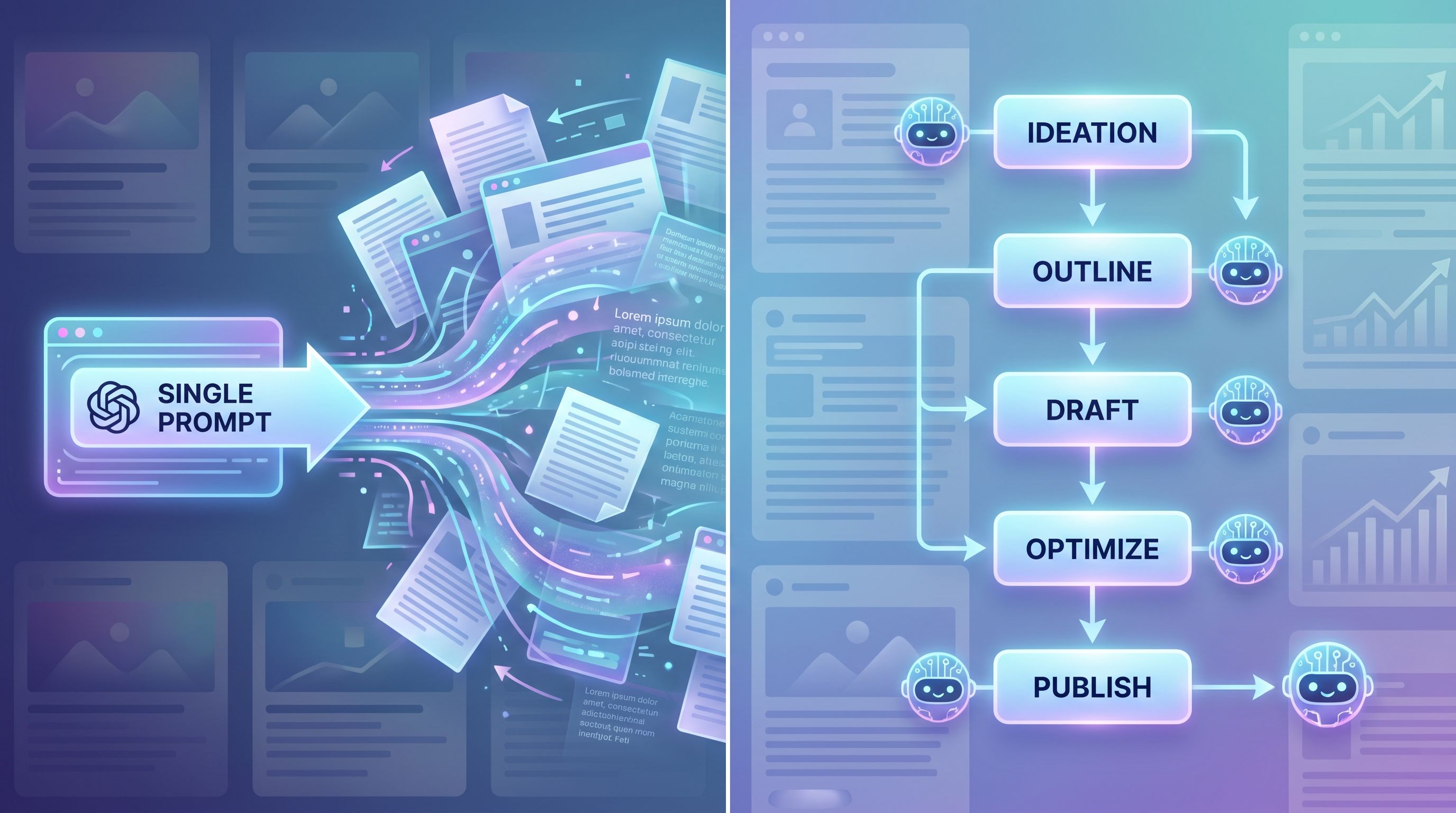
Think of these as prompt playlists: a chain of saved, repeatable instructions you can run over and over for different topics, audiences, and formats.
Platforms like Blogg are built around that idea. Instead of you manually copying prompts into a generic AI each time, you define the playlist once, plug in your topics, and let the system run—ideation → drafting → optimization—on autopilot.
This post walks through how to design those playlists so your blog becomes a predictable engine, not a series of lucky breaks.
Why Prompt Playlists Beat One‑Off Prompts
One‑off prompts feel flexible, but they quietly create chaos:
- Every new piece of content feels like starting from scratch.
- Quality swings wildly depending on who’s prompting (and how tired they are).
- You can’t easily delegate, because the “magic” lives in someone’s head.
Prompt playlists flip that script. They give you:
1. Consistency across dozens or hundreds of posts
When you run the same sequence for each topic, you get:
- Similar structure and depth
- Predictable on‑page SEO elements
- A recognizable brand voice
That’s critical if you’re publishing at scale with a tool like Blogg or running a lean, AI‑assisted content operation.
2. Speed without losing control
Instead of:
- “Write a 1,500‑word post about [topic].”
You have:
- Step 1 prompts that generate angles and outlines
- Step 2 prompts that draft sections
- Step 3 prompts that optimize for search, clarity, and CTAs
You can automate the middle while still reviewing key checkpoints.
3. Easier collaboration and delegation
A playlist can be:
- Documented
- Shared
- Improved over time
That’s very different from a senior marketer’s private library of “good prompts.” It’s closer to an internal playbook—similar to how we turn SOPs into SEO assets in From SOPs to SEO: How to Turn Internal Process Docs into Blogg-Powered Traffic Magnets.
4. A real feedback loop
When your process is consistent, you can:
- Compare performance across posts
- See which steps in the playlist correlate with better rankings or conversions
- Make targeted tweaks instead of random experiments
This is the same mindset shift we talked about in From Editorial Calendar to ‘Experiment Board’: Using AI to Rapid-Test Blog Angles, CTAs, and Formats Before You Scale: your blog becomes a lab, not just a publishing schedule.

The Core Idea: Treat Your Blog Workflow Like a Production Line
Before you write a single prompt, map your ideal blog workflow.
For most B2B teams, a high‑level flow looks like this:
-
Input gathering
- Topic or keyword
- Target audience and intent
- Source material (SOPs, call transcripts, feature docs, etc.)
-
Ideation & angle selection
- Generate possible angles
- Pick one that aligns with business goals and search intent
-
Outline & structure
- Headings, subheadings, logical flow
- Where examples, data, and CTAs will go
-
Drafting
- Section‑by‑section or full‑post draft
- Incorporate brand voice and product positioning
-
Optimization
- On‑page SEO
- Readability and clarity
- Internal links and CTAs
-
Review & publish
- Human edits
- Final checks
- CMS formatting and scheduling
A prompt playlist is simply the AI version of that workflow: a saved sequence of prompts that walk each post through those stages.
Designing Your First Prompt Playlist (Step by Step)
Let’s build a concrete playlist you can adapt. Assume you’re writing SEO‑driven posts for a SaaS product.
Step 1: Standardize Your Inputs
AI is only as good as what you feed it. Create a simple intake template you (or your team) fill out for every post:
- Primary keyword / topic
- Search intent (informational, comparison, how‑to, etc.)
- Target audience (role, industry, stage in funnel)
- Goal of the post (traffic, demos, self‑serve signups, onboarding help, retention)
- Key product angle (which feature, use case, or outcome you want to highlight)
- Source material links (docs, transcripts, decks)
In Blogg, this kind of structure is baked into how you define topics and briefs. If you’re doing it manually in an AI chat, keep these fields in a reusable template.
Step 2: The Ideation & Angle Prompt
Your first prompt in the playlist should:
- Take the structured inputs
- Generate multiple angles
- Explain why each angle might work
You might ask your AI tool to:
- List 5–10 possible angles
- Map each angle to search intent and funnel stage
- Suggest a working title and meta description for each
Then you (or your strategist) pick 1–2 angles to pursue.
Step 3: The Outline Prompt
Now you lock in the structure. Your outline prompt should:
- Re‑state the chosen angle and goal
- Ask for a detailed H2/H3 outline
- Specify:
- Desired word count range
- Required sections (intro, summary, FAQ, CTA, etc.)
- Where to weave in product mentions without being salesy
You can also instruct the AI to:
- Include a short bullet list of examples under each section
- Flag where data, quotes, or screenshots would help
This is where a playlist shines: the outline format is consistent across posts, so your team knows exactly what to expect.
Step 4: The Drafting Prompt(s)
Instead of “write the whole article,” break drafting into section‑based prompts. That gives you more control and better quality.
For each major section (e.g., H2):
- Provide the section heading and bullet points from the outline
- Remind the AI of:
- Target audience
- Tone of voice
- Product positioning
- Ask for:
- Clear subheadings
- Examples tied to real workflows
- Smooth transitions to the next section
You can also have a separate drafting prompt dedicated to product integration, so you avoid either over‑pitching or forgetting to mention the product at all.
This is where an opinionated platform like Blogg helps: it can systematically insert product context in ways that match your strategy, instead of leaving it to whoever happens to be prompting that day.
Step 5: The Optimization Prompt
Once you have a full draft, run it through a dedicated optimization prompt that focuses on:
-
On‑page SEO
- Natural use of primary and secondary keywords
- Descriptive headings
- Short, scannable paragraphs
-
Search‑aware structure
Especially important as AI Overviews and zero‑click results get more common. You want:- Clear, answer‑style sections
- Concise definitions and lists
- FAQ blocks that can be pulled into snippets
For more on this style of structuring, see The ‘Search-Aware’ AI Blog: Structuring Posts to Survive SGE, AI Overviews, and Zero-Click Results.
-
Conversion elements
- Contextual CTAs
- Internal links to supporting posts and product pages
-
Brand and compliance checks
- Remove claims you can’t support
- Align terminology with your style guide
Your optimization prompt can literally walk through a checklist—similar to the approach in The ‘Always-Be-Indexed’ Checklist: Technical SEO Must-Haves for High-Volume AI Blogs, but focused on on‑page content rather than technical SEO.
Step 6: The Human Review Checklist
Prompt playlists don’t replace humans—they focus them.
Instead of rewriting entire drafts, your reviewer can:
- Verify examples and product details
- Add proprietary insights or data
- Adjust tone for nuance
- Approve or tweak CTAs
You can even have a small “review prompt” that:
- Summarizes the draft
- Highlights any potentially risky claims
- Suggests 2–3 alternate titles and intros
That makes the human review faster and more strategic.
Turning Playlists into Reusable Templates Your Team Actually Uses
A playlist is only valuable if people use it. A few practical tips:
1. Name and document each playlist
Treat each playlist like an internal playbook:
- Name (e.g., “SEO How‑To Post,” “Feature Launch Deep Dive,” “Onboarding Help Article”)
- When to use it (goals, audience, funnel stage)
- Inputs required (your intake template)
- Approximate time saved compared to writing from scratch
Store these in a shared space (Notion, Confluence, internal wiki) and link directly to the prompts or Blogg workflows that implement them.
2. Start with 2–3 core playlists, not 20
You don’t need a playlist for every possible scenario. Focus on the formats that matter most for your blog’s goals, such as:
- SEO how‑to guides that attract top‑ and mid‑funnel traffic
- Problem/solution posts that map to specific pains your product solves
- Onboarding and help content that reduces churn and support tickets
Later, you can expand into:
- Case studies
- Comparison pages
- Event recaps
3. Bake in product and lifecycle thinking
Your playlists should reflect where the reader is in their journey.
For example, a top‑funnel how‑to playlist might:
- Emphasize education and problem framing
- Introduce your product lightly as one of several options
A post‑purchase onboarding playlist might:
- Assume the reader is already a customer
- Lean heavily on your UI, workflows, and best practices
- Reuse blog content inside your product tours or help center—similar to the strategy in From Blogg Draft to Onboarding Guide: Reusing AI Posts to Shorten Time-to-Value for New Customers.
4. Add feedback loops to your playlists
Make it easy for your team to:
- Suggest improvements to specific prompts
- Flag recurring issues (e.g., “intros are too generic,” “CTAs feel repetitive”)
- Share examples of high‑performing posts created with each playlist
Once a quarter, review:
- Which playlists you actually used
- How posts from each playlist performed (traffic, rankings, conversions, assisted revenue)
- What changes you want to test next
If you’re using Blogg, you can connect these dots more directly: playlists map to templates and workflows, and performance data flows back into your topic and template decisions.
Real-World Example: A Simple Playlist for SEO How‑To Posts
Here’s a concrete outline you can adapt immediately.
Inputs
- Topic: “AI blogging for local service businesses”
- Primary keyword: “local SEO AI blogging”
- Audience: owners/marketers of local service businesses
- Goal: drive trials of your AI blogging product
Prompt 1 – Angle generation
- Ask for 5 angles that:
- Address local SEO challenges
- Show how AI can realistically help
- Avoid overpromising “set it and forget it” results
Prompt 2 – Outline
- Choose the best angle
- Request a detailed outline with:
- Intro that names the pain clearly
- Sections on research, content creation, local optimization, measurement
- 2–3 places to weave in your product as an example
- A final section on next steps
Prompt 3 – Draft sections
- For each H2, generate 400–600 words with:
- Step‑by‑step advice
- Examples specific to local businesses (plumbers, clinics, med spas, etc.)
- Subheadings and bullet lists
Prompt 4 – Optimize
- Run the full draft through:
- Keyword and related phrase check
- Readability improvements
- Suggestions for internal links and a primary CTA
Prompt 5 – Review assist
- Ask the AI to:
- Summarize the post in 3 bullets
- Highlight any strong or weak sections
- Propose 3 alternate titles and 3 meta descriptions
From there, a human editor spends 20–30 minutes polishing and publishing. If you codify this as a playlist in Blogg, much of it can run automatically whenever you add a new topic to your queue.
How Prompt Playlists Fit Into an Automated Blogging Platform
If you’re doing all of this manually in a generic AI chat, you’ll quickly hit a ceiling. Copy‑pasting prompts, chasing drafts across tabs, and trying to keep track of which version is final gets old fast.
That’s where an opinionated platform like Blogg comes in:
- You define your prompt playlists as templates and workflows.
- You connect them to your topic backlog and publishing schedule.
- The system handles ideation → drafting → optimization → scheduling in the background.
You still control:
- Which topics go into the machine
- How your brand voice and product are represented
- The final approval step before anything goes live
But you’re no longer relying on heroic effort or a single “prompt wizard” to keep your blog alive.
Bringing It All Together
Prompt playlists transform AI from a clever toy into an actual content system.
Instead of:
- Random prompts
- Inconsistent quality
- Constant reinventing of the wheel
You get:
- Reusable workflows that map to your real publishing process
- Predictable quality across dozens or hundreds of posts
- Faster output without sacrificing control or brand standards
- Clear feedback loops so you can improve over time
That’s how you turn “we sometimes use AI to help with content” into “we run an always‑on, AI‑powered blog that feeds our pipeline.”
Your Next Step
You don’t need a perfect system to start. You just need one playlist.
Here’s a simple way to move forward this week:
- Pick one high‑impact format (e.g., SEO how‑to guides).
- Map your current workflow from idea to published post.
- Turn each step into a clear, reusable prompt.
- Save those prompts in a shared doc—or better yet, implement them as a workflow in Blogg.
- Run your next 3 posts through that playlist and compare the experience and results to your old way of working.
If you want your blog to feel less like a side project and more like a reliable channel, this is where it starts: not with a single brilliant prompt, but with a playlist you can hit “repeat” on.
Design the playlist once. Let AI—and a platform like Blogg—handle the repetition.