From Live Chat Logs to Search Traffic: Turning Real-Time Questions into an Always-On AI Blog Engine


If you have live chat on your site, you’re already sitting on one of the richest content sources your business will ever have.
Every:
- “How does this work with Salesforce?”
- “What happens if we go over our usage?”
- “Is this secure enough for healthcare data?”
…is a search query in disguise.
The problem? Those answers usually live and die inside chat windows. Your team answers the same questions over and over in real time, while your blog quietly goes stale.
This post is about fixing that gap—by turning live chat conversations into a structured, AI-powered blog engine that:
- Publishes helpful, SEO-optimized posts every week
- Reduces repetitive questions for your team
- Captures search demand from people who haven’t found you yet
- Keeps working 24/7, long after the chat session ends
And we’ll look at how a platform like Blogg can sit in the middle as the engine that turns raw chat logs into consistent, on-brand, search-ready content.
Why Live Chat Is the Strongest Fuel for an AI Blog Engine
Most teams start their content planning in a keyword tool. That’s useful—but it’s also abstract. Live chat is different.
Live chat gives you:
- Exact phrasing your buyers use
- Real objections and anxieties, not just informational queries
- Context about who’s asking (role, company size, use case)
- Fresh signals about what’s changing in your market
If you’ve read our post on turning every sales and support conversation into content, you know the power here: your conversations are the clearest signal of what the market actually cares about. (The ‘Zero Waste Content’ System goes deeper on this idea.)
Now imagine you:
- Stream those questions into a central system.
- Use AI to cluster, prioritize, and outline them.
- Have an engine like Blogg automatically generate, QA, and schedule posts.
That’s how you move from “we answer questions all day” to “our answers compound as evergreen search traffic.”
The Core Shift: From Ephemeral Answers to Search-Ready Assets
Think of every chat answer as having two lives:
- Live mode – fast, tailored, ephemeral.
- Library mode – structured, reusable, discoverable.
Right now, most teams only operate in live mode. An always-on AI blog engine adds library mode as a default.
The mindset shift:
- From: “We answered that, done.”
- To: “We answered that once; now how do we make sure 10,000 future visitors can find it without opening chat?”
Once you make that shift, your job becomes designing a workflow that:
- Captures the right chat data
- Cleans and structures it for AI
- Uses AI to generate outlines and drafts that reflect your brand
- Publishes in a way that builds topical authority, not random one-off posts
If you’ve explored our ‘Signal, Not Noise’ briefing approach, this will feel familiar. You’re doing the same thing—turning messy input into structured briefs—just with chat logs as the raw material.
Step 1: Decide Which Chat Streams Actually Matter
Not every chat transcript deserves to become a blog post.
Start by mapping your chat channels and tagging the ones with the highest content value:
- Pre-sales chat on your marketing site – goldmine for search-focused content and objection-handling posts.
- In-app chat with existing customers – great for feature education, advanced use cases, and troubleshooting content.
- Support chat on your help center – fuel for both documentation and “bridge” posts that connect docs to higher-level strategy.
Create a simple policy:
- Must-capture: New objections, repeated questions, competitive comparisons, pricing/ROI concerns, implementation fears.
- Nice-to-capture: Edge cases, niche integrations, highly specific bugs.
- Skip: Purely account-specific issues, sensitive data, or anything that shouldn’t be public.
Most chat tools (Intercom, Zendesk, HubSpot, Drift, etc.) let you:
- Tag conversations
- Export transcripts
- Trigger webhooks or workflows when certain tags are applied
That’s your first automation hook: whenever a conversation is tagged as “content-worthy,” send it to your AI content system.
Step 2: Strip Out the Messy Stuff Before AI Ever Sees It
Raw chat logs are noisy:
- Greetings and small talk
- Personally identifiable information
- Off-topic detours
- Internal notes
If you feed that straight into an AI writing workflow, you’ll get:
- Posts that quote customers verbatim without consent
- Drafts that wander off-topic
- Hallucinated details trying to “fill in” gaps
You want a repeatable pre-processing step. At minimum:
- Anonymize – remove names, emails, company identifiers, and any sensitive data.
- Extract the core question(s) – what was the user really trying to figure out?
- Capture context – role, industry, plan level, relevant product features.
- Summarize the answer – what did your team actually say that should be preserved?
This can be semi-automated:
- Use your chat tool’s API to export tagged transcripts.
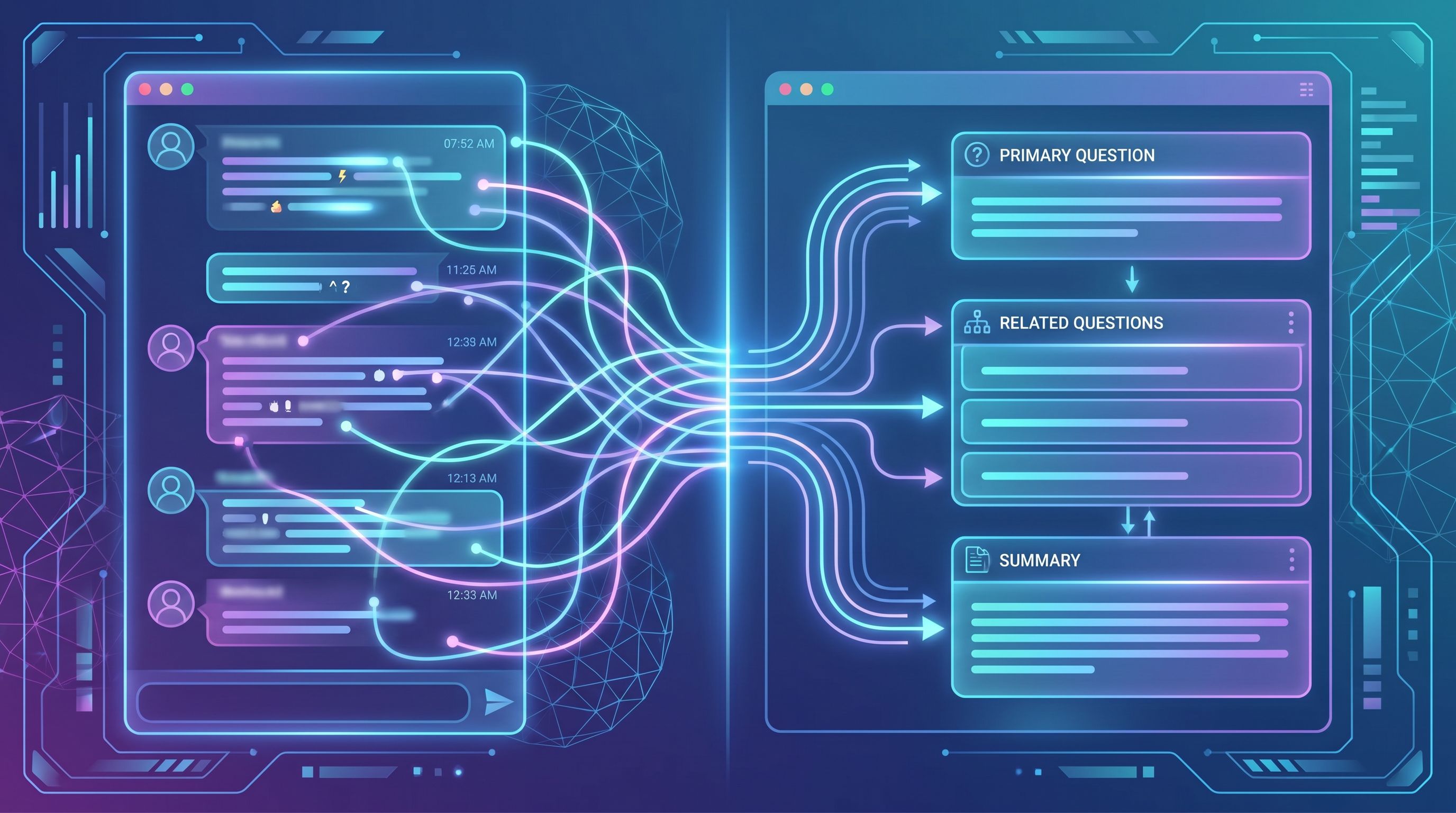
- Run them through an AI prompt that outputs a structured summary:
primary_questionrelated_questionsuser_profileproduct_features_mentionedsupport_answer_summarysensitive_details_removed: yes/no
Platforms like Blogg can take this structured input as the “brief” layer that feeds your blog engine, instead of trying to work from raw transcripts.
Step 3: Turn Questions into Search-Focused Content Opportunities
Not every question should become a standalone post. Some are better as:
- A section in an existing article
- A short FAQ snippet
- A paragraph in a comparison guide
This is where search intent and content structure matter.
For each structured chat summary, have AI (or your strategist) classify:
-
Intent type
- Informational: “How does your API authentication work?”
- Comparative: “How do you differ from Tool X for agencies?”
- Transactional: “Can I upgrade mid-cycle without losing data?”
-
Search potential
- Are there obvious keywords or phrases people would type into Google?
- Does this map to a known topic cluster you’re already building? (If you’re not clustering yet, see Beyond Topical Authority: Structuring AI-Generated Content Clusters Around Jobs-to-Be-Done, Not Just Keywords.)
-
Best content format
- Deep-dive guide
- “How it works” explainer
- Case-study flavored answer
- Comparison breakdown
- Short FAQ addition to an existing post
Then, design simple routing rules, for example:
- High-intent, high-frequency questions → full SEO posts
- Medium-intent, medium-frequency questions → grouped into “mega FAQ” or pillar pages
- Low-intent, low-frequency questions → handled only in docs or support macros
This classification can be automated with AI, but you’ll want a human to review it at first until you trust the patterns.
Step 4: Build Reusable Brief Templates for Chat-Derived Posts
Once you know which questions deserve posts, the next step is to brief AI in a consistent way.
A simple brief template for chat-derived posts might include:
- Working title & angle – e.g., “Is It Safe to Migrate Our CRM Mid-Quarter? A Practical Guide for RevOps Leaders”
- Primary question from chat – in the customer’s own words
- Who’s asking – role, company size, use case
- What we want readers to do next – book a demo, start a trial, explore pricing, read a related guide
- Key product points to include – features, limitations, differentiators
- Non-negotiables – claims to avoid, phrases to use, legal constraints
If you’ve already built a “voice system” using something like our Voice Vault, this is where you plug it in. The brief tells AI what to say; the voice system tells it how to say it.
In a platform like Blogg, you can codify this as a template:
- Input: structured chat summary
- Auto-apply: voice guidelines, product positioning, SEO rules
- Output: first draft that already feels 80% on-brand
Step 5: Let AI Draft, but Keep Humans in the Loop Where It Matters
You don’t want your blog to read like a transcript dump. Nor do you want AI inventing product behavior.
Set up a simple review flow:
- AI generates outline
- Based on the brief, AI proposes H2/H3 structure, FAQs, and internal links.
- Human reviews outline
- Check for accuracy, gaps, and alignment with your content strategy.
- Add notes: “Include example from ACME case study,” “Avoid promising X for EU customers,” etc.
- AI generates draft
- Uses approved outline + voice rules.
- Human edits for nuance & truth
- Fix product specifics, add real screenshots or anecdotes, adjust tone.
If you have multiple teams touching content, this is where lightweight AI guardrails help. Our post on designing simple rules for multi-team AI usage shows how to keep everyone aligned without creating bureaucracy: From Editorial Chaos to ‘AI Guardrails’: Designing Simple Rules So Multiple Teams Can Safely Use Blogg.

Step 6: Wire It into an Always-On Publishing Engine
So far, we’ve focused on turning individual chats into posts. The real leverage comes when this becomes a continuous loop.
An always-on engine looks like:
-
Automatic ingestion
- Tagged chat conversations are exported daily or weekly.
- Structured summaries land in a “content inbox.”
-
AI-powered triage
- Each item is scored on potential impact (search volume proxy, strategic priority, frequency in chat).
- Top items are slotted into a rolling content calendar.
-
Template-based production
- Brief templates + voice guidelines + SEO rules are applied automatically.
- Drafts are generated, reviewed, and queued.
-
Smart scheduling
- Posts are scheduled to maintain a healthy cadence, not a one-week spike.
- Related posts are grouped to build clusters around key jobs-to-be-done.
-
Feedback loop
- Over time, you track which chat-derived posts:
- Reduce repetitive questions in chat
- Drive search traffic and assisted conversions
- Those signals inform which future questions get prioritized.
- Over time, you track which chat-derived posts:
This is where a platform like Blogg acts less like a writing tool and more like a virtual content ops manager—handling the grunt work of ideation, drafting, and scheduling so your team can focus on strategy.
If you want to see what that looks like at scale, we break down workflows, permissions, and QA in: How to Use Blogg as a Virtual Content Ops Manager: Workflows, Permissions, and QA for High‑Volume Publishing.
Step 7: Close the Loop with Analytics and Chat Deflection
The final piece is proving that this engine isn’t just “more content,” but better outcomes.
Track two types of metrics:
1. Blog & SEO performance
- Organic traffic to chat-derived posts
- Keyword rankings for the questions you’re targeting
- Time on page & scroll depth (are people actually reading?)
- Assisted conversions (demo requests, trials, signups influenced by these posts)
This is similar to the workflow we outlined in Analytics to Action: Using AI to Translate Blog Performance Data into Your Next 20 Post Ideas.
2. Chat & support impact
- Volume of repeated questions over time
- Example: if you publish a strong “How does billing work?” explainer, you should see fewer billing questions in chat.
- Deflection rate
- How often your chat widget suggests a relevant article before a human needs to step in.
- Handle time
- Even when people still ask, can agents answer faster by dropping a link to a canonical post?
When you connect these dots, you can say things like:
- “This cluster of five posts reduced onboarding-related chat volume by 18% and drives 3,000 organic visits/month.”
That’s how your blog graduates from “nice to have” to “critical support and acquisition asset.”
Common Pitfalls (and How to Avoid Them)
A few traps to watch out for as you build this engine:
-
Publishing one-off, disconnected posts
- Fix: Group related questions into clusters and pillar pages. Use internal links intentionally.
-
Over-promising in content vs. what support can deliver
- Fix: Involve product and support in reviewing sensitive posts; keep a shared “claims we can make” doc.
-
Letting AI drift off-brand
- Fix: Maintain a central voice and positioning system (see the Voice Vault post) and bake it into every AI prompt or platform configuration.
-
Ignoring old content
- Fix: When new chat questions overlap with existing posts, update and consolidate instead of starting from scratch. Our guide on cleaning up content debt shows how to do this without hurting SEO: The ‘Content Debt’ Clean-Up: Using AI to Audit, Merge, and Prune Old Posts Without Killing Your SEO.
Bringing It All Together
If you’re already running live chat, you’ve already done the hard part: talking to customers every day.
The opportunity is to:
- Capture the best questions and answers systematically.
- Structure them so AI can understand and repurpose them.
- Translate them into search-focused briefs and outlines.
- Publish consistently through an always-on engine.
- Measure the impact on both search and support.
Do that, and your blog stops being a side project. It becomes an extension of your best chat agents—working around the clock, answering questions for people who haven’t met you yet.
Where to Start This Week
If this feels like a lot, don’t try to automate everything at once. Start with a simple, manual pilot:
- Pick one chat channel (e.g., pre-sales chat on your pricing page).
- Tag 20–30 “content-worthy” conversations over the next week.
- Manually summarize those chats into a simple template: question, who asked, context, our answer.
- Choose 3–5 questions with clear search potential and business impact.
- Use AI to draft posts from those summaries, applying your brand voice and product nuance.
- Publish and track how they perform—both in search and in future chat volume.
Once you see the signal, then you can justify wiring it into a more automated, always-on workflow using a platform like Blogg.
Ready to Turn Your Chat Window into a Search Engine Magnet?
Your team is already doing the hard work of answering real questions in real time. The next step is making sure those answers don’t disappear when the chat window closes.
If you want help turning live chat logs into a steady stream of SEO-optimized, on-brand posts—without building a complex system from scratch—explore how Blogg can act as your always-on AI blog engine.
Start with a single channel, a handful of tagged conversations, and a simple workflow. Once you see your first chat-derived posts ranking and reducing repetitive questions, you’ll wonder why you ever let those insights vanish in the first place.